 Novrix Sports
Running a session
How the line rotates
Fair, Winners stay or Manual, and choosing a game yourself when you need to.
Choosing how the line moves
Open Queue settings ( next to the tabs) and tap Rotation:
- Fair: longest wait and fewest games go first, with new partners and opponents. Best for most open play.
- In order: strictly the next players in line.
- Winners stay: winners stay on and split up; the next two in line join them, and losers go to the back. Set Games in a row (2 by default) so winners go back to the line after that many. Volleyball and basketball keep winning teams together.
- Manual: you pick every game. Nothing starts on its own; a free court shows Pick players.
When there are just enough players to fill every court (8 on 2 courts), Fair doesn’t put the same four straight back on. A free court waits for the next game to finish, then both start with everyone mixed. Tap Start anyway to play straight away.
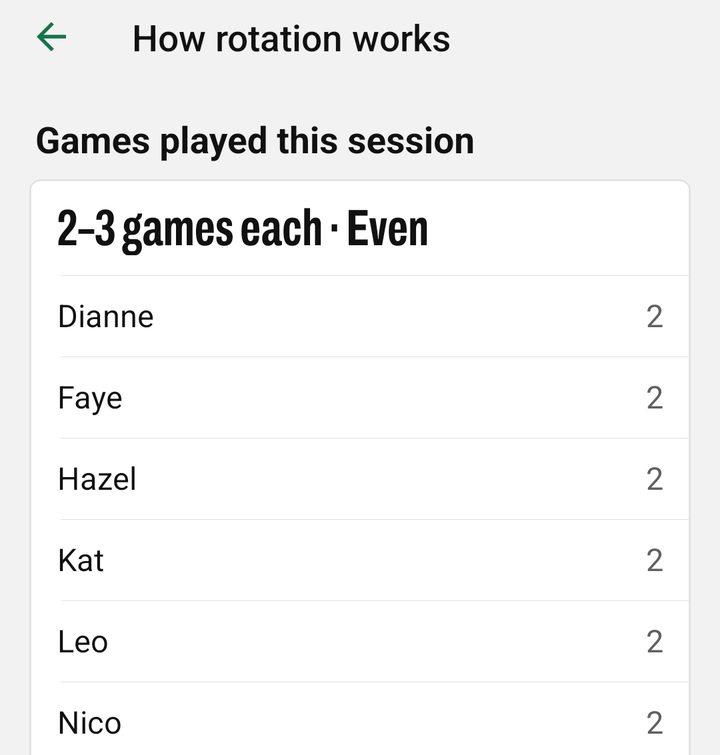
To see how your rotation picks, tap the Rotation line on the This session card, or How rotation works in Queue settings. It also shows how many games each player has had, and who’s behind.
Choosing a game yourself
Any mode lets you step in:
- Edit on a free court: tap players to fill each team, then Start game.
- Line up a game: on the Players tab, tap Select above the line, tick a full game of players, then Line up game. Lined-up games go on before anyone else, on the next free court.
- In Next games, tap a game to Play first or Lock in, and drag ≡ to change the order.
- On Up next, tap a player, then another, to swap them between games. With levels set, an uneven game says Uneven by level; Even up the teams splits the same players more evenly.
- When lined-up games put someone later than fair rotation would, the note under Next games names them, so you can see what a change costs.
- On a waiting player’s ••• menu, Play next, Move up and To back move them in the line.
Teams
By default the app mixes partners so people play with someone new. Under Teams in Queue settings you can choose Random teams instead, or use levels.