 Novrix Sports
More
Running a tournament
Choose a format, enter teams, call matches to courts, and share the results.
Tournaments are free while in preview. On the Queue tab, switch the control at the top from Open play to Tournament, then tap Set up a tournament. Your open-play queue is kept and comes back when you switch back.
Step 1: Choose the format
Give it a Name (or leave it blank) and, if you like, an Event such as “Men’s doubles”. Then tap Format and pick one:
- Knockout: lose once and you’re out. Top seeds get any byes. Optional Third-place match.
- Double elimination: lose twice and you’re out. With Final reset, the final is played again if the lower-bracket side wins it.
- Round robin: everyone plays everyone; best record wins. Optionally Play each other twice.
- Groups, then knockout: round robin in groups, then the top of each group goes through. Set how many Groups and how many Go through from each group.
- Swiss: a set number of Rounds, each pairing entries with the same record, with no rematches.
Step 2: Enter the teams
- For doubles, choose Fixed teams or Draw partners. Drawn partners can be Random or Balanced by level, using the levels from your queue.
- Type the entries, one per line. For fixed teams, put both names on a line, like Ana & Ben. Or tap Add everyone from the queue.
- Choose Seeding: As listed (the first entry is the top seed), Random or By level.
Step 3: Set the matches
- Games per match: 1 game, Best of 3 or Best of 5. In a bracket, The final can be longer.
- No-show forfeit: once a match is called, each side has 5, 10 or 15 minutes to reach the court, or loses by walkover.
- Rest between matches: keeps a player who has just finished off court for a few minutes.
- How many courts to use (up to 8).
Tap Start tournament. If something’s missing, the app says what in red, such as a team without enough players.
Step 4: Run the matches
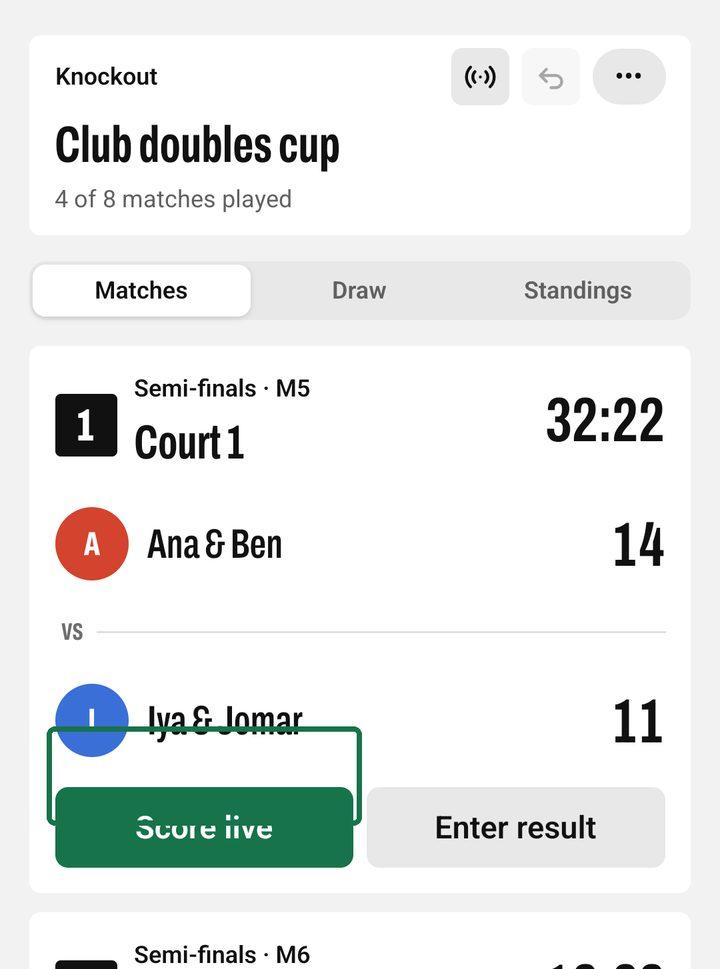
- On Matches, Up next lists every match that can start. Tap Start to put it on the first free court, or Fill free courts to fill them all.
- With a no-show limit, a started match is Called: tap Here beside each side as they arrive. A side that doesn’t make it in time loses by walkover.
- To score point by point, tap Score live and hand the phone to the umpire: tap a side to give it the point, and −1 to take one back. Games and the match close by themselves.
- Or tap Enter result and type each game’s points, then Save result. No scores? Tap the winner’s name. For a side that didn’t play, use Walkover….
Made a mistake? Tap the finished match and change it, or Clear result. The undo button at the top takes back recent steps.
Draw and Standings
Draw shows the brackets, groups and rounds, with names like “Winner of M3” until they’re known. Standings shows the places so far. To withdraw an entry, tap it in Standings and choose Withdraw; their remaining matches go to the other side. Tap them again to bring them back.
More than one event
Tap ••• at the top and Add an event to run, say, Men’s doubles and Mixed on the same courts. A player in two events is never called to two courts at once.
Sharing the results
When an event ends, its podium shows on Matches. Tap Share results there, or in the ••• menu, and choose Share as a picture or Share as text. With a live board on (the live button at the top), players follow the matches on their phones, and the TV shows what’s on court, up next, results and each event’s draw and standings.